What Is Base64 Encoding and When Should You Use It?
A plain-English explanation of Base64 encoding, how it works, and practical use cases for developers.
If you have spent any time in web development, you have almost certainly encountered Base64 — in image data URIs, API authentication headers, or encoded file attachments. But what exactly is Base64, and when should you use it?
What Is Base64?
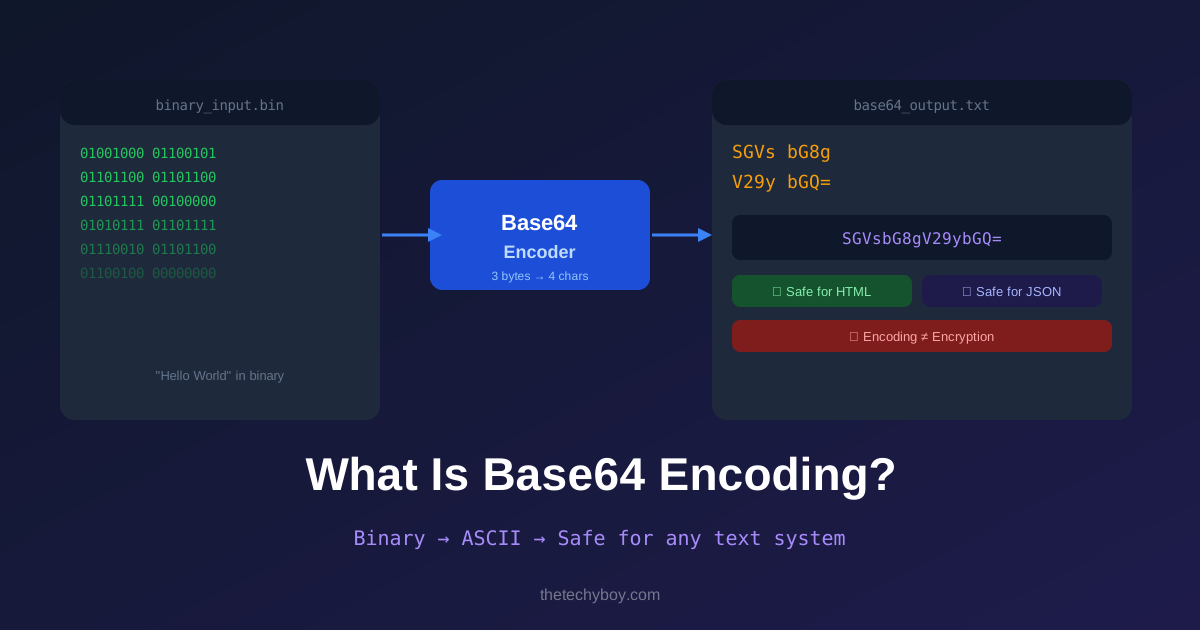
Base64 is an encoding scheme that converts binary data into a string of ASCII text characters. It represents binary data using a set of 64 printable characters: A–Z, a–z, 0–9, and the symbols + and /, with = used for padding.
The name "Base64" comes from the fact that it uses 64 distinct characters to represent data. Every 3 bytes of binary data becomes 4 Base64 characters, which means Base64-encoded data is approximately 33% larger than the original.
Why Does Base64 Exist?
Many protocols and systems were originally designed to handle only text — not arbitrary binary data. Email (SMTP), HTML, JSON, and XML are all text-based. Base64 solves the problem of transmitting binary data (images, files, audio) safely through these text-based systems without corruption.
Common Use Cases
1. Embedding Images in HTML/CSS
Instead of linking to an external image file, you can embed the image directly as a Base64 string:
<img src="data:image/png;base64,iVBORw0KGgoAAAANSUhEUgAA...">This eliminates an HTTP request and is useful for small icons and logos. Use the Image to Base64 tool to convert any image instantly.
2. API Authentication
HTTP Basic Authentication sends credentials as a Base64-encoded string in the request header:
Authorization: Basic dXNlcm5hbWU6cGFzc3dvcmQ=3. Email Attachments
The MIME standard uses Base64 to encode file attachments in emails, ensuring binary files are transmitted safely through mail servers.
4. Storing Binary Data in JSON
JSON does not support binary data natively. Base64 allows you to include images, audio, or file content as a string field within a JSON payload.
Is Base64 Encryption?
No — Base64 is encoding, not encryption. It is trivially reversible and provides zero security. Anyone can decode a Base64 string instantly. Never use Base64 to "hide" sensitive data — use proper encryption for that.
How to Encode and Decode Base64 Online
TheTechyBoy offers free tools for both directions:
- Text to Base64 — encode any text string
- Base64 to Text — decode any Base64 string back to text
- Image to Base64 — convert image files to Base64 data URIs
- Base64 to Image — decode a Base64 string back to an image
Conclusion
Base64 is a fundamental tool in any developer's toolkit. It solves the real-world problem of transmitting binary data through text-based systems safely and reliably. Just remember — it is encoding, not encryption.
Popular Tools
Recent Posts